eReferrals
Improving the referral experience for patients, referrers and clinicians.
Bayside Health Alfred now accepts electronic referrals (eReferrals) through the Consultmed platform for Specialist Outpatient Clinic Services at The Alfred, Sandringham Hospital, and Caulfield Hospital Home, Acute, and Community Services.
Important Update: As of 1st August 2026, referrals to Caulfield Home, Acute and Community Services (HAC) are mandatory via Consultmed and will no longer be accepted through other referral pathways.
This includes services such as Community Rehabilitation, HARP, Falls Clinic, Cognitive Decline and Memory Service, Continence Service, Chronic Wound Clinic, Cardiac Rehabilitation and other HAC programs.
The Alfred and Sandringham hospital preference is for submitting eReferrals, but referrals to The Alfred and Sandringham continue to be accepted by fax, email and mail whilst we transition to Consultmed eReferral.
eReferrals at Bayside Health Alfred
Consultmed eReferrals will provide an enhanced user experience, making it quicker and easier for you to send referrals securely.
Referrers benefit from:
- In-built referral guidelines and Statewide Referral Criteria requirements
- Simple attachment of reports, images and results
- Acknowledgement receipt. Notification of referral outcome will be directly from Bayside Health Alfred as usual
- Integration with Best Practice, Medical Director and Gentu, whilst referrers with other practice management software (PMS) types will be able to utilise the Consultmed web portal to send electronic referrals
Please submit your next referral to Alfred Health via Consultmed.
log in or create a free Consultmed account
Advice & Guidance
We are piloting an online system for GP's to access additional support from Endocrinology & Diabetes consultants. This ‘Advice & Guidance’ feature will allow GPs to seek the advice of a specialist via secure asynchronous digital communication. GPs will be able to ask questions to support management of their patient without necessarily requesting an outpatient appointment. Find out more about Advice & Guidance.
Fast Access Re-Entry Pathway
The Fast Access Re-Entry (FARE) Pathway, currently in place in Neurosurgery, Paediatrics and Urology clinics, is being extended to include Cardiology and Geriatrics at Bayside Health Alfred. The FARE Pathway is for patients that have recently been discharged and require further specialist treatment or follow up for the same presenting problem. GPs can indicate a referral to the FARE Pathway by selecting this option on the eReferral form for these clinics.
Creating a Consultmed account
Go to app.consultmed.co to set up a free and secure Consultmed account.
Once an account is created, you will receive a welcome email with step-by-step guides to send an eReferral along with other helpful guides such as PMS integration instructions.
Details provided will be used to send and manage future eReferrals. Multiple places of practice may be added per healthcare provider.
For a fast, secure and reliable eReferral process
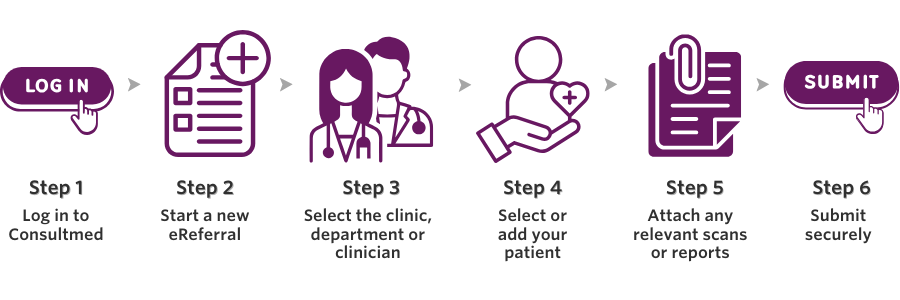
Refer your patient via eReferral
- Completed referrals are sent securely to the department or clinic selected
- You will receive an acknowledgement of receipt for each referral
To send an eReferral to Bayside Health Alfred you will need to create a free and secure Consultmed account.
Start a new eReferraleReferral resources & support
Visit app.consultmed.co to setup a free and secure Consultmed account.
For Consultmed Technical support
Find out more Technical Support.
Support Resources
MedicalDirector
The native Consultmed integration for MedicalDirector Clinical has the Consultmed widget embedded directly into the MD Clinical sidebar, allowing GPs to launch Consultmed without leaving their screen.
Best Practice
If your clinic uses Best Practice, you can integrate Consultmed through Halo Connect. Your Practice Manager will need to create a Consultmed account and complete the setup. After that, all GPs in your practice can be added, and the integration will work at the server level.
Gentu
To integrate Gentu Practice Management Software (PMS) with Consultmed, simply link your Gentu account during the sign-up process or at any time after your Consultmed account has been set up.
Other PMS
Not using one of the PMS listed above? You can still create an account and send referrals directly through the Consultmed web application.
Tips to get started
Healthcare providers should create individual Consultmed accounts to comply with data privacy and security standards. Shared email logins cannot be used.
Practice Managers can create their own Consultmed accounts and invite GPs to join their practice and manage user access. See the Admin Portal Quick Reference Guide to help you with these steps.
For account setup or technical assistance, please contact the Consultmed team via the Contact Us page.
If you have any questions or would like to provide feedback directly, please contact our GP Liaison team:
- Email: gp.liaison@alfred.org.au
- Phone: (03) 9076 2620